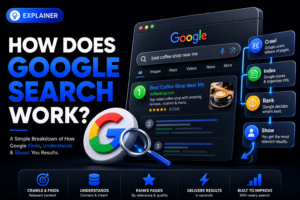

How does Google Search work? Google discovers pages with automated crawlers, analyzes their content for its index, and selects useful results when someone searches. These stages are called crawling, indexing, and serving search results. Being published online does not guarantee that a page will appear in Google.
For a Swedish business, this explains why a new service page may be online but still difficult to find. The first task is to identify which stage needs attention: discovery, indexing, or relevance to the searches your customers make.
Key Takeaways
Google crawls, indexes, then ranks web pages
A sitemap supports discovery, not guaranteed indexing
Search intent matters more than repeating keywords
Technical barriers can block visibility completely
Local signals strengthen searches with local intent
Google Search Uses Crawling, Indexing, and Ranking
Google describes three stages of Search: crawlers discover and retrieve pages, indexing systems interpret and organize their content, and ranking systems select results for a query. Indexing makes a page eligible to appear; it does not guarantee visibility.
This process happens continuously. When you publish a new page about roof repairs in Malmö, Google does not automatically know it exists. Googlebot needs to find a path to it through internal links, an XML sitemap, external links, or known site patterns.
Crawling: How Googlebot Finds Pages
Googlebot is Google’s automated crawler. It visits pages, reads links, processes available page content, and returns later based on many signals, including how often a site changes and how easily it can be accessed.
A page buried four or five clicks away from your homepage is harder to discover than a page linked from your main service navigation. Keep your most valuable pages close to the site structure: homepage, service category, then service page is a sensible three-step route.
Googlebot also encounters limits. Login walls, blocked resources, server errors, and robots.txt rules can prevent access. Repeated server errors can reduce crawling and eventually affect indexing. Blocking crawling is different from preventing indexing: Google can sometimes list a blocked URL based on links to it, without understanding its page content.
Indexing: Google Decides What It Can Store
After crawling, Google evaluates whether it can add a page to the Google Search index. The index is Google’s searchable database of pages and information, not a live copy of every URL on the internet.
Submitting an XML sitemap through Google Search Console tells Google which URLs you consider important. It does not force Google to index them. Google can exclude pages that are duplicates, thin, blocked by a noindex tag, redirected, or too similar to another page.
For example, a Stockholm electrician with six near-identical pages targeting six suburbs may find Google indexes only one or two. Give each location page real local value, such as service coverage, relevant project details, parking information, or clear contact options.
Ranking: Google Matches Results to a Search
When someone searches for “emergency plumber Uppsala,” Google does not pull up a fixed list. It evaluates the query and compares indexed pages using many ranking systems and signals.
Google looks for relevance, usefulness, location, freshness where relevant, page experience, and signals of credibility. A strong backlink cannot rescue a page that explains nothing, loads poorly on mobile, or is blocked from indexing.
The order changes by query. A search for “what is VAT” needs an explanatory answer. A search for “accountant Gothenburg” needs nearby, trustworthy business options.
Query Understanding Starts With Search Intent
Google tries to understand what the person wants, not merely match the words they typed. That is why keyword repetition alone does not produce rankings. Build each page for one clear customer need.
Search intent usually falls into four practical categories: informational, navigational, commercial research, and transactional. A user searching “Google Search Console” wants a destination or tool. Someone searching “SEO agency Sweden pricing” is comparing options before making contact.
Match the Page Type to the Search
Check the first page of results before you write. If Google shows guides, explanations, and videos for a query, publishing a short sales page is the wrong response. If results are local companies and map listings, a broad blog post will struggle to satisfy that need.
For a query such as “web design in Västerås,” users normally expect agency websites, portfolios, service details, and a way to contact a provider. Your page should state what you offer, who it is for, where you work, what the process looks like, and how to request a quote.
Do not force one page to serve every purpose. A guide on website costs and a web design service page can link to each other, but they should answer different questions.
Keywords Explain the Topic, Not the Entire Strategy
Use the words customers use in page titles, headings, body copy, image alt text where relevant, and internal link anchors. Put the primary phrase naturally near the top, then cover related questions a buyer needs answered.
For a Swedish accountant, terms might include “bookkeeping,” “annual accounts,” “limited company,” and “digital accounting.” The useful content comes from explaining the service, deadlines, suitability, and process, not from placing “accountant Stockholm” in every paragraph.
Google’s language systems understand related wording and context. Repeated, unnatural keyword phrases make pages worse for visitors and do not create a stronger service offer.
Content Quality and E-E-A-T Build Relevance and Trust
Google wants results that are useful and trustworthy for the query. In practice, that means clear content written for real people, with evidence that the business behind it is legitimate. Helpful content answers the task before asking for a sale.
Google discusses experience, expertise, authoritativeness, and trust in its guidance on helpful content. E-E-A-T is not a single ranking factor or score. It is a useful way to assess whether information deserves a reader’s confidence, especially where inaccurate advice could cause harm.
Show First-Hand Knowledge Where It Matters
A page about installing heat pumps should explain practical issues a buyer faces, such as property size, installation planning, service access, and who performs the work. It should not recycle generic phrases from manufacturer pages.
For high-impact topics involving health, legal advice, or finance, accuracy matters even more. State qualifications where appropriate, identify the business, provide contact details, and avoid claims you cannot support.
Add real business details. A Swedish company should show its organization number, a physical service area where relevant, and clear terms for bookings or purchases. These details help customers verify who they are dealing with.
Keep Important Pages Current
Outdated content creates bad signals for people. A page that mentions a discontinued service, an old address, or 2023 opening hours can create lost leads even if it still receives traffic.
Review priority pages at least every six months. Check prices, contact forms, staff information, product availability, and internal links. For seasonal businesses, review pages before the season starts, such as before winter demand for snow removal or summer demand for garden work.
Google may revisit pages at different rates. Freshness matters most where the query expects current information, such as event schedules, operating hours, or changing regulations.
Make Authorship and Business Ownership Clear
Anonymous content is weak when customers need to trust the source. Publish an About page, contact page, privacy information, and clear author or editorial details for advice-driven content.
A short author box can help explain why someone is qualified to write about a subject. Do not invent credentials. If content comes from a team, name the company and explain the review process in plain language.
Credibility also appears off-site. Accurate listings, reputable mentions, and genuine customer feedback on platforms such as Google Business Profile support a consistent business identity.
Links and Site Architecture Tell Google What Matters
Internal links guide visitors and Googlebot through your website. External links from other sites can signal that others find your pages worth referencing, but links work best when the destination page already deserves to rank.
A clean site architecture is often the fastest improvement for a small business site. Start by identifying your revenue-driving pages, then make sure they are reachable through logical navigation and contextual links from related pages.
Build Clear Internal Paths
Use descriptive anchor text. Link “commercial cleaning services in Lund” to the relevant service page instead of using vague text such as “click here.” This helps users and gives Google more context about the destination.
A simple structure often works well:
Homepage links to core service categories.
Category pages link to individual services.
Service pages link to related guides and case material.
Guides link back to the relevant service page.
Contact and location information remain easy to reach.
Avoid creating dozens of low-value pages that differ only by a city name. Build a smaller set of useful service and location pages with clear purpose.
Earn Relevant External Links
A backlink is a link from another website to yours. Its relevance and context matter; a useful mention from a local organization can also send interested visitors directly to your business.
Earn references by publishing useful resources, building real partnerships, or contributing expertise to relevant publications and local organizations. Paid placements and sponsorship links should be marked appropriately rather than bought to manipulate rankings.
Do not buy bulk backlink packages. They tend to create low-quality links and distract from the work that improves conversion and visibility.
Avoid Orphan Pages
An orphan page has no internal links pointing to it. Google may find it through a sitemap, but users will not naturally reach it, and its role in your site is unclear.
Compare a crawl of the site with your known URL list, sitemap, and Search Console data to find poorly connected pages. A crawler alone may miss a page that has no links to it. Add useful links from related pages rather than placing every URL in the main menu.
Technical SEO Removes Barriers Before You Add More Content
Technical SEO makes it possible for Google to access, render, understand, and index your site. It is less visible than writing content, but a broken technical setup can erase the value of every new page. Fix crawlability before investing heavily in new articles.
Start with Google Search Console. Its Pages report shows reasons URLs may not be indexed, while URL Inspection lets you check a specific page’s crawl and indexing status.
Check the Most Common Blocking Issues
Check noindex directives, robots.txt restrictions, accidental password protection, redirect loops, missing pages, and server errors. A noindex directive prevents indexing only when Google can access and read it; combining it with a crawl block can stop that from happening.
Google may choose a different canonical URL when pages have similar content. A canonical tag expresses your preferred version; it is a signal, not an absolute instruction. Keep redirects, sitemaps, internal links, and canonical tags consistent.
Do not panic when Search Console labels some URLs as excluded. Filter pages, internal search results, tracking URLs, and duplicates often should not appear in Google.
Make Mobile Rendering and Speed Practical
Google primarily uses the mobile version of a page for indexing. Your mobile site needs the same meaningful content, headings, links, and structured data as the desktop version.
Test important pages with PageSpeed Insights, Lighthouse, and real mobile devices. The old Mobile-Friendly Test has been retired. Check whether the page’s content, navigation, forms, and phone links remain usable on a small screen; performance scores alone do not measure the whole experience.
For a local trade business, a fast contact page matters more than a decorative animation. If the call button fails on an iPhone or the form hides below oversized images, you lose enquiries regardless of rankings.
Use Structured Data Carefully
Structured data describes entities and page details in a machine-readable format. Use supported types that fit the visible content, such as Organization, Product, or BreadcrumbList, and follow the requirements for each type. Do not add markup for information the page does not actually contain.
Structured data does not guarantee rich results or higher rankings. Check eligible implementations with Google’s Rich Results Test and address errors in required properties. A technically valid result still has to satisfy Google’s feature-specific policies.
For help separating access problems from content problems, Beast Productions’ SEO services can support a focused audit.
If usability or performance is the obstacle, the web design and development team can help improve the underlying pages.
Search Results Include More Than Ten Blue Links
A results page can combine organic links with local listings, images, videos, shopping features, and AI-assisted answers. What appears depends on the query and available features. Paid advertising does not buy better organic rankings.
AI Overviews and AI Mode may answer a question while linking to supporting websites. Google’s guidance for AI search features says that ordinary SEO fundamentals still apply: an eligible supporting page must be indexed and able to show a search snippet. No special AI schema is required, and inclusion is not guaranteed.
Local Search Depends on Prominence, Relevance, and Distance
For nearby searches, Google may show a local pack or Maps results. Its local ranking guidance describes relevance, distance, and prominence. A complete, accurate Business Profile helps people and Google understand what you offer and where you operate.
Keep the same core business information on your website and profile. If your phone number differs between your contact page and your profile, resolve it. Inconsistent details create confusion for customers and weaken confidence in your local presence.
Distance changes results. A bakery in Södermalm should describe its actual location and service rather than claim coverage it does not provide. Our local SEO explainer describes how a Business Profile and useful local website pages work together.
Common Google Search Mistakes That Waste Time
Most ranking problems come from basic gaps, not secret algorithm penalties. The practical fix is to remove obstacles, improve the page’s usefulness, and measure the right signals. Do not chase rankings before checking indexing.
Start with one priority page and inspect it in Search Console. URL Inspection is more useful for diagnosing indexing than assuming that an unsuccessful manual Google search proves a page is absent from the index.
Mistake: Treating a Sitemap as a Ranking Tool
An XML sitemap is a list of URLs, not a quality signal. It helps Google discover pages, especially on larger websites or sites with weak internal linking, but it does not make those pages worthy of indexation or strong rankings.
Submit a clean sitemap that includes only canonical, indexable URLs. Remove redirected, noindex, duplicate, and error pages from it. Then use internal links to show which pages you want visitors to find.
Mistake: Publishing Thin Location and Service Pages
A page with generic copy and a swapped city name gives users little reason to choose you. Length alone does not establish quality; meaningful local detail and a useful answer matter more.
Create fewer pages with stronger information. Include the customer problem, scope of work, process, service area, proof you can verify, and a clear way to get in touch. If you cannot add meaningful local detail, keep one wider-area service page instead.
Mistake: Measuring the Wrong Outcome
Ranking position is volatile and personalized by location, device, and query wording. Track organic clicks, qualified enquiries, phone calls, booked meetings, and sales alongside visibility.
Give changes enough time to be crawled and assessed. A technical correction can show in Search Console quickly, while a new competitive service page often needs several weeks or longer to establish performance. Keep a dated change log so you know what changed and when.
Conclusion
Start with Google Search Console, then inspect one revenue-driving page. Fix indexation barriers first, improve the page for its exact search intent second, and strengthen internal links and local business details third. Publish the next page only when it answers a customer question your current site does not answer well.
Frequently Asked Questions
How long does Google take to index a new page?
There is no fixed indexing deadline or guarantee. You can request indexing in Search Console, include the URL in a sitemap, and link to it from a relevant page. Ensure that it is accessible and indexable, then investigate any reported issues instead of submitting the same request repeatedly.
Does changing a page title improve Google rankings?
A better title can improve relevance and clicks when it accurately describes the page, but it will not fix weak content or technical blocks. Change titles to match real search intent, not to add repeated keywords.
Can a small Swedish business rank against large brands?
Yes, especially for specific services and local searches where a large brand lacks relevant local information. Focus on a defined area, complete Google Business Profile details, useful service pages, and clear proof of business legitimacy.
Why is my page indexed but not receiving traffic?
Indexed only means Google has stored the page; it does not mean the page ranks prominently for searched terms. Check Search Console queries, compare your page with the actual results, and improve the missing intent, information, or local relevance.